General
Intro
This guide describes general errors you may experience with Dais. It lists the potential causes of errors and how Dais reacts when those error are encountered.
NOTE: When reporting an error, please remember to include:
- The steps to reproduce the issue.
- Timestamp (with timezone).
App IdandRegion(if known).- Any other details that could assist with troubleshooting.
Error Layers
Errors can occur in at the following layers in the Dais architecture:
- App: issues in the frontend or backend of an app that runs on Dais.
- Core: issues with Dais itself.
- Infrastructure - issues with the infrastructure Dais and apps run on.
- External Integrations - issues with external tools and services that Dais and apps integrate with.
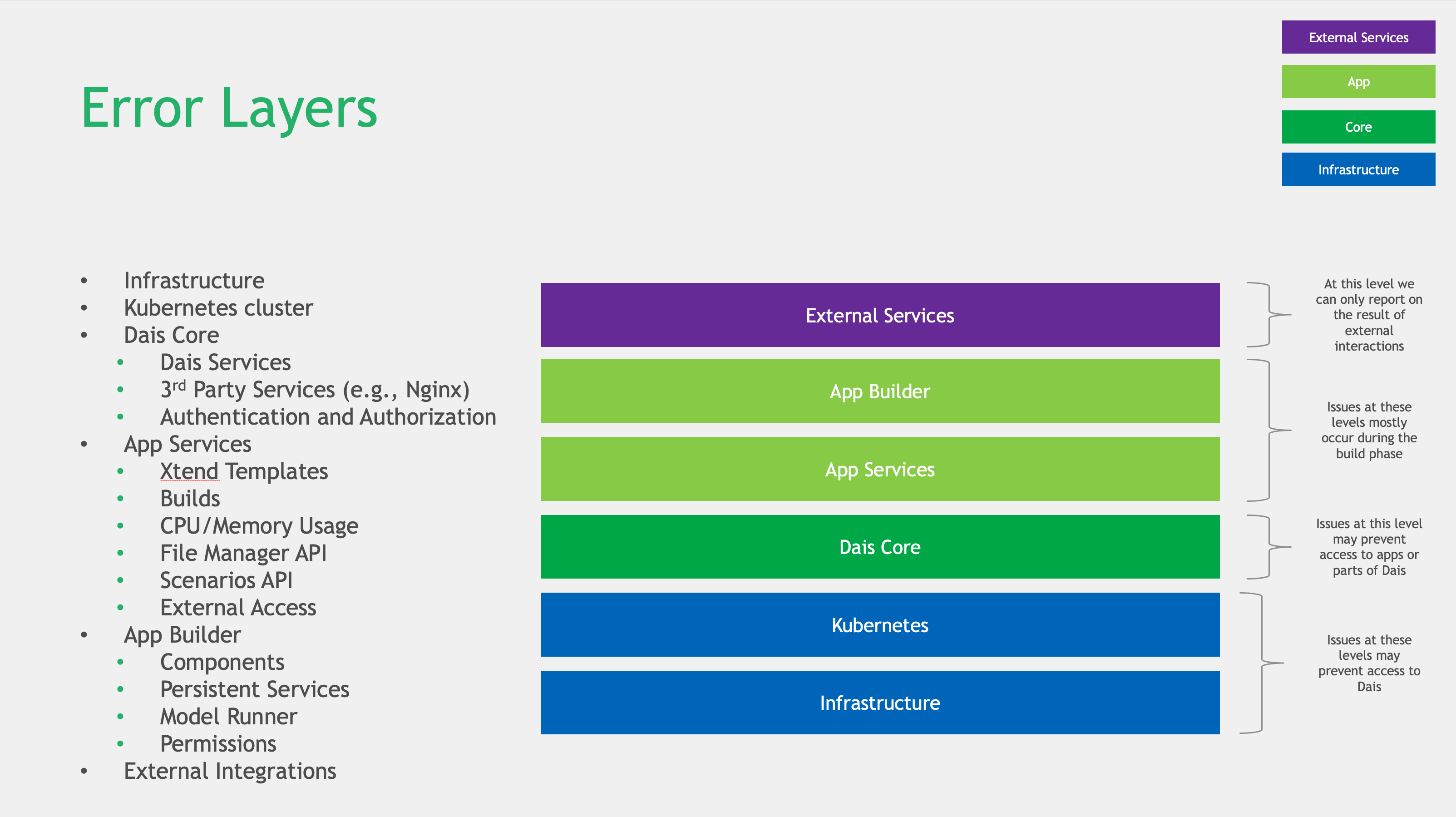
Errors/Causes
NOTE: HTTP 503 error codes as general rule are considered as infrastructure related issues.
For the infrastructure troubleshooting guides please reference the infrastructure documentation.
For a more information on HTTP error codes, please refer to:
You may be notified of errors as follows:
- API Call Errors - An error toast message will be shown in format
ErrorCode: Error message. - Page Load Errors - An
Unrecoverable Errorpage will be displayed with error details and a link to the troubleshoot documentation. - Infrastructure Errors - When Dais detects an error with the infrastructure it runs on, it will display a
500 Internal Server Errorpage.
Errors are classified according to the following severity levels:
CRITICAL- Dais cannot continue the operation, and further troubleshooting is required. Usually seen with infrastructure-related errors.ERROR- Dais can continue to operate, and refresh the page or retry the action that triggered the error may resolve it. The root cause of the error should still be investigated after the incident.WARNING- Dais detected an issue that may be a problem, but does not affect its ability to operate.
Errors are grouped as follows:
- External Component Errors: Parts of the system not managed and configured by Dais: database, blob storage, docker registries, etc.
- Internal Dais Components Errors: Parts of the system managed and configured by the Dais: core services, internal 3rd-party services such as Redis, etc.
External Component Errors
File System Errors
Error HTTP status code: 403, 503
FileSystemError: Reported when a general error is encountered while fetching files from bucket/storage and/or there is an issue with authorization.- Message (403): 'External file system authorization error'
- Message (503): 'External file system error'
Database Errors
Error HTTP status code: 503
ConnectionError: Reported when a general error occurs connecting to a database.\- Message: 'Database connection error'
AccessDeniedError: Reported when a connection to a database is refused due to insufficient privileges.- Message: 'Database access denied'
ConnectionAcquireTimeoutError: Reported when connection is not acquired due to timeout.- Message: 'Database connection acquire timeout'
ConnectionRefusedError: Reported when a connection to a database is refused.- Message: 'Database connection refused'
ConnectionTimedOutError: Reported when a connection to a database times out.- Message: 'Database connection timeout'
HostNotFoundError: Reported when a connection to a database has a hostname that was not found.- Message: 'Database host not found'
HostNotReachableError: Reported when a connection to a database has a hostname that was not reachable.- Message: 'Database host not reachable'
InvalidConnectionError: Reported when a connection to a database has invalid values for any of the connection parameters.- Message: 'Database invalid connection'
TimeoutError: Reported when a database query times out because of a deadlock.- Message: 'Database query times out'
App Errors
Error HTTP status code: 4xx
GitConfigError: Reported when an error is encountered with the configuration of a Git repository within Dais, for example when a misconfigured build config is detected.- Message: Passed through from component error occurred in.
DockerRegistryError: Reported when Dais encounters an issue with the Docker registry it is configured to use, for example with the registry is misconfigured.- Message: Passed through from component error occurred in.
AppError: Reported when an error occurs in a Dais application, for example when project gateway is unable to call a persistent service.- Message: Passed through from component error occurred in.
Internal Dais Component Errors
File System Errors
Error HTTP status code: 404
DaisFileNotFound: Occurs when Dais cannot file a file it expects at a specified location.- Message: 'File not found'
Database Errors
Error HTTP status code: 503
DataBaseError: A generic database error that does not fit to any of the above external database errors, requires troubleshooting to identify the root cause.- Message: 'Database error'
Dais Errors
Error HTTP status code: 4xx, 5xx
DaisError: General Dais errors, usually the4xxgroup of errors that can be resolved with some client-side action (ex. adjusting the payload sent to the Dais API). In some corner cases it may also be a5xxerror.- NOTE: If the
503 Service Temporarily Unavailableand/or just500 Internal Server Erroris throw withDaisErrorcode, then the root case is an infrastructure issue. If the error returns after a page refresh or API call retry then further investigation is required.
- NOTE: If the
KubernetesError: Issues related to Kubernetes infrastructure. If the error returns after a page refresh or API call retry then further investigation is required.AxiosError: Reported when an error occurs internally between Dais microservices. If the error returns after a page refresh or API call retry then further investigation is required.